Blazing Story
⚙️ Configure layouts
If you want to apply the same layout for every story, you can specify the layout component to use when displaying a story. This architecture is mostly the same as Blazor's standard layout mechanism (see also: "ASP.NET Core Blazor layouts | Microsoft Learn"). A layout component must inherit from the LayoutComponentBase class and should have the rendering @Body in its markup. If you apply the layout component like the one below to stories,
@inherits LayoutComponentBase
<YourThemeProvider>
    <div style="padding: 24px;">
        @Body
    </div>
</YourThemeProvider>
The story which applied the layout component above will be rendered as a child component of the <YourThemeProvider> component (imagine you implemented that component such a component including some cascading values) and will have 24-pixel padding.
Layout levels
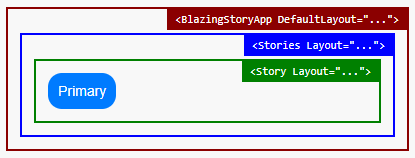
You can specify a layout at three levels. These layouts do not override each other — instead, they are nested: the application-level layout wraps the outermost layer, the stories-level layout wraps inside it, and the story-level layout wraps the innermost layer around the story content.
Application level layout
You can specify the layout for the application level via the DefaultLayout property of the BlazingStoryApp component, which is usually marked up in your App.razor file.
<BlazingStoryApp ... DefaultLayout="typeof(DefaultLayout)">
</BlazingStoryApp>
In the above case, the layout component DefaultLayout.razor will be used as the outermost layer when displaying every story.
Component (Stories) level layout
You can specify the layout for the component (stories) level via the Layout parameter of the <Stories> component.
@attribute [Stories(...)]

<Stories ... Layout="typeof(StoriesLayout)">
    ...
In the above case, when displaying stories within the <Stories> markup, the layout component StoriesLayout.razor will be nested inside the application-level layout.
Story level layout
You can specify the layout for the story level via the Layout parameter of the <Story> component.
@attribute [Stories(...)]

<Stories ...>
    <Story Name="..." Layout="typeof(StoryLayout)">
        ...
In the above case, when displaying the story named "...", the layout component StoryLayout.razor will be the innermost layer, nested inside the stories-level layout.
The order of applying the layouts
The application level layout will be used on the outermost level, and the story level layout will be used on the innermost level. The component (stories) level layout will be used in the middle level of them.